StarTech.com ACCSMNT
- RS Stock No.:
- 186-1683
- Distrelec หมายเลขบทความ:
- 302-13-799
- หมายเลขชิ้นส่วนของผู้ผลิต / Mfr. Part No.:
- ACCSMNT
- ผู้ผลิต:
- StarTech.com

ยอดรวมย่อย (1 ชิ้น)*
THB1,825.40
(ไม่รวมภาษีมูลค่าเพิ่ม)
THB1,953.18
(รวมภาษีมูลค่าเพิ่ม)
ส่งฟรีหากซื้อเกิน ฿2,500.00
มีในสต็อกของผู้ผลิต
- พร้อมส่งจากวันที่ 14 กันยายน 2569
ต้องการสินค้าเพิ่มหรือไม่ ระบุจำนวนและคลิก ‘ตรวจสอบวันจัดส่ง’ เพื่อดูข้อมูลเพิ่มเติมเกี่ยวกับสต็อกสินค้าและการจัดส่ง
ชิ้น | ต่อหน่วย |
|---|---|
| 1 + | THB1,825.40 |
*ตัวบ่งบอกราคา / price indicative
ผู้ให้การสนับสนุน
- RS Stock No.:
- 186-1683
- Distrelec หมายเลขบทความ:
- 302-13-799
- หมายเลขชิ้นส่วนของผู้ผลิต / Mfr. Part No.:
- ACCSMNT
- ผู้ผลิต:
- StarTech.com
คุณสมบัติ / Specifications
ข้อมูลทางเทคนิค / Technical Data Sheets
Legislation and Compliance
รายละเอียดสินค้า / Product Details
ค้นหาผลิตภัณฑ์ที่คล้ายกันโดยเลือกคุณลักษณะอย่างน้อยหนึ่งรายการ
เลือกทั้งหมด | คุณลักษณะ | ค่า |
|---|---|---|
| Brand | StarTech.com | |
| เลือกทั้งหมด | ||
|---|---|---|
Brand StarTech.com | ||
- COO (Country of Origin):
- CN
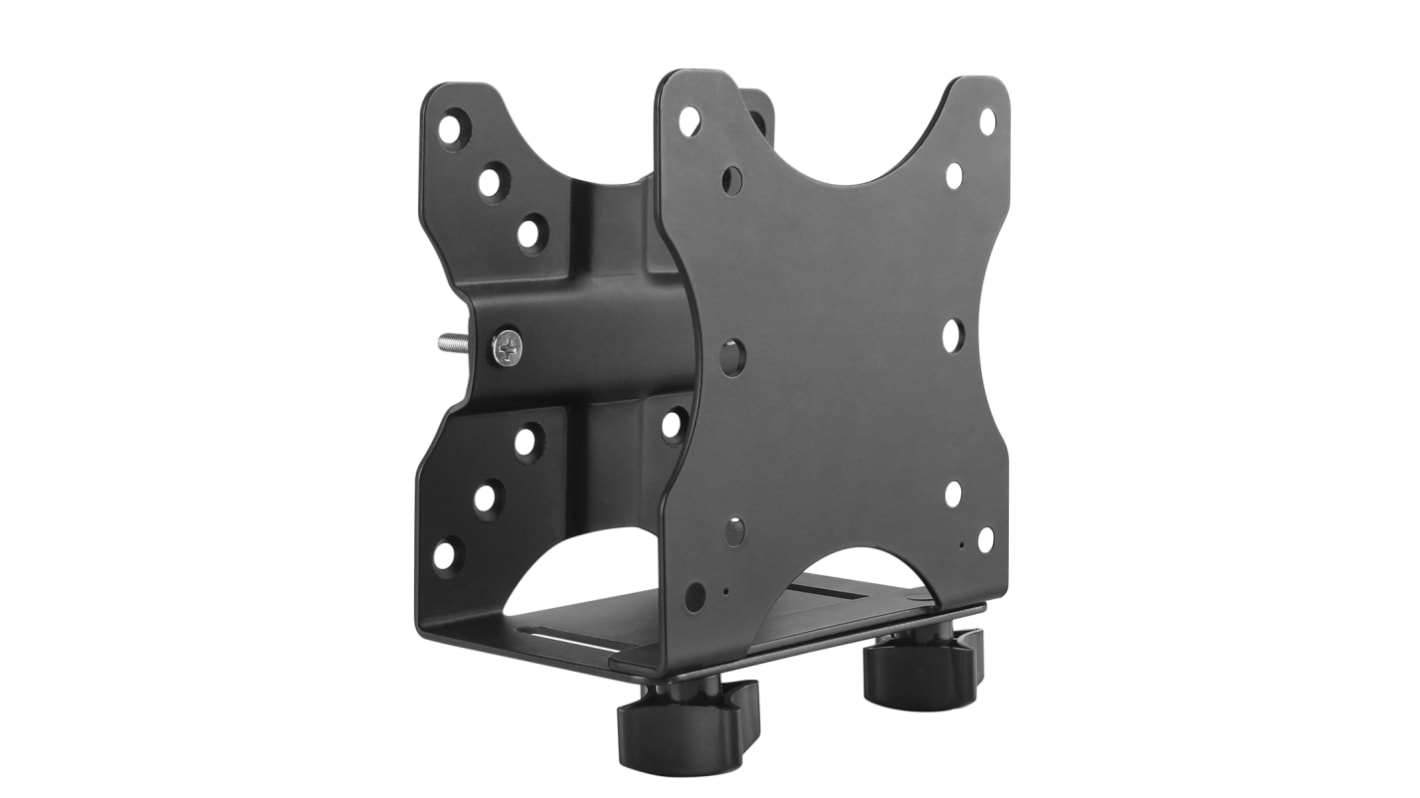
ACCSMNT Thin Client Mount
This thin-client mounting bracket provides an excellent space-saving solution, by letting you mount your thin-client PC or docking station to create a clutter-free workspace.
Multiple installation methods
The versatile double-sided VESA mount offers several installation options, enabling you to mount your thin-client PC or dock to the back of your monitor or under your desktop, or clamp it to a monitor-mount pole. The mount supports 75x75, and 100x100 VESA mount compatibility, making it suitable for most monitors and monitor mounts.
Store a variety of products
This adjustable mount is Ideal for holding an Intel® NUC, Mac Mini, most small CPUs, thin clients, docking stations, or USB hubs that fit within the width adjustability of the mount (.7" to 2.8" / 17 mm to 70 mm). The mount can support up to 11 lb. (5 kg). It also features an adjustable strap to help keep your devices secure, and rubber pads to secure products with non-parallel surfaces.
Unrestricted Access
The open-frame design of the mount allows unrestricted access to your computer.
The ACCSMNT is backed by a StarTech.com 5-year warranty and free lifetime technical support.
Features & Benefits
• Save space and reduce cable clutter by mounting your thin-client PC or docking station to the back of your monitor, clamped to a monitor-mount pole, or under your desk
• Supports up to 11 lb. (5 kg)
• Adjustable width from .7" to 2.8" (17 mm to 70 mm)
• 75x75 and 100x100 VESA mount compatibility
• Rubber pads to prevent damage to your device
• Keep your device secure with the adjustable strap
• Easily access your computer with the open-frame design
Applications
• Create a clutter-free work space in office, business, commercial and institutional environments
• Enhance your home office by maximizing your desktop space
What’s in the package?
• mounting bracket
• adjustable strap
• pole mount
• pads
• M5x25 mm screws
• M4x12 mm screws
• M4 nuts
• screws
• washers
• instruction manual
FAQs
How easy is it to install the thin-client mounting bracket ?
The thin-client mounting bracket is provided with all the necessary mounting materials. All StarTech mounts come with installations manuals and offers step-by-step guidance for safe mounting.
Does the thin-client mounting bracket tilt or swivel?
No, the mounting bracket does not feature tilt or swivel capabilities.
Where can I find my VESA configuration size?
It is advised that you look in your product manual to find the correct VESA size. If you do not have this available, you can measure the distance between the four holes in the back of your TV or Monitor. Measure the horizontal and vertical distances from the holes.
Mounting Options
Back of Monitor, Under Desktop, or Clamped to Monitor-Mount Pole
Height Adjustment
No
Material
Steel & Plastic